Review & sign-off
Give a decision on a revision, follow the reviewers, and keep a record when the round closes.
Open the Review tab with the Review button in the top bar (or Review in the phone bottom bar). The title reads Review of {name}, with the due date when there is one.
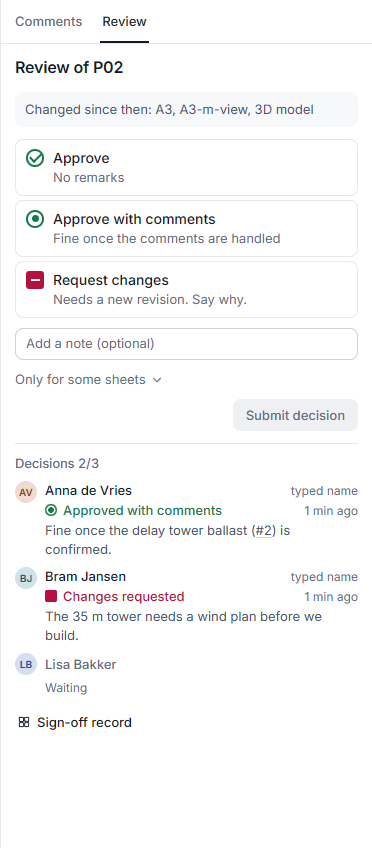
Give your decision
| Option | Meaning |
|---|---|
| Approve | No remarks. |
| Approve with comments | Fine once the comments are handled. |
| Request changes | Needs a new revision. A note is required: What has to change? |
- Choose Approve, Approve with comments or Request changes.
- Type a note in Add a note (optional).
- Choose Submit decision. The toast says Your decision was recorded.
- The first decision asks for your name.
- To change your mind, use Change my decision or Update decision. Withdraw removes it.
- Only for some sheets lets you decide on selected sheets (the 3D model counts as one). Decide the rest covers the others later.
- When you choose Approve, a warning shows if comments are still open on this revision, or stayed behind on earlier ones.
- If you decided before, the tab reminds you what you said and which sheets changed since then.
- A superseded revision takes no decisions. Go to the current revision.
- While a round is closed, nobody can give, change or withdraw a decision. The owner must reopen the round first.
Who decided
- The heading Decisions n/m counts the reviewers who decided.
- Each row shows the person, the decision, the time and the note (with links like #4 to comments).
- People who did not decide yet show Invited, not opened yet, Has seen this revision or Waiting.
- Only named reviewers count. Someone else who decides shows Not counted: not a reviewer.
- Tags show how the name was given: typed name, a verified tick (came through a personal link), or Owner.
Owner: close the round
- Remind sends a reminder to one person. Remind everyone who is waiting reminds all. You can send by email, or copy a message with the link.
- Close this round… shows how many reviewers decided, how many comments are open and who asked for changes. You choose the outcome (Approve, Approve with comments or Request changes), add an optional note for everyone, and choose Close the round.
- A closed round shows Round closed with the outcome. The outcome also shows on the revision row. Reopen the round undoes it.
- This revision holds the editable facts: the revision code (for example P03), Issued for (For comment, For coordination, For approval, For construction, As built), the Note (what changed) and the review due date.
- Sign-off record opens a grid of all decisions and the decision history. Use Download CSV or Print. Others can see it once decisions exist.
After the final round, the owner can hand over the project. See Sharing & owner tools. The sign-off record is part of the archive.